Paste a URL, and in seconds an AI rebuilds it into a running, previewable, chat-editable modern React app.
That’s the first impression of firecrawl/open-lovable — 27k stars, 5.2k forks, 94.9% TypeScript, a flagship open-source example built by the Firecrawl team. It targets the commercial product Lovable.dev (the README says outright “for a complete cloud solution, use Lovable.dev”) and sits in the brutally crowded “AI app generator” lane alongside Lovable, Bolt.new, v0, and Replit Agent.
But the thing I want to dissect isn’t “it generates code” — that’s no longer novel. What genuinely interests me is its engineering posture: it uses no agent framework, no LangGraph, no Claude Agent SDK, not even the model’s native tool-calling. It uses a single primitive from the Vercel AI SDK — streamText() — and then hand-rolls the entire scaffold a usable coding agent needs.
If you read my earlier piece, The Agent Engineering Map , you’ll recall one central claim: the model is bought, the harness is built, and your entire engineering leverage lives in that 98.4%. open-lovable is a superb, line-by-line verifiable specimen of that claim. This article walks four dimensions: product positioning → agent architecture → the DIY harness (its own chapter) → the cloud sandbox (its own chapter), then lands on takeaways.
The code-level facts here come mainly from cross-reading the repository and its DeepWiki index; key sources are cited.
1. Product: A Growth Funnel Disguised as an App
What it actually is
In one line: paste a URL or describe an app, and the AI generates and live-previews a running React app inside a cloud sandbox. Three core modes:
- Clone mode: Firecrawl scrapes the target site’s Markdown + screenshot, and the AI rebuilds it as a modern React app;
- Brand Extension: extract only the target site’s design tokens — colors, typography, spacing — then generate brand-new pages under that brand system;
- Search-based generation: search first, scrape, then generate.
The clever part is its commercial intent
open-lovable doesn’t monetize directly. It’s Firecrawl’s acquisition funnel and technical business card — to run it, you must supply a FIRECRAWL_API_KEY. So those 27k stars almost all become prospective users of Firecrawl’s scraping API.
This is a growth strategy worth studying: dress up a relatively dull middleware (“scraping”) as a tangible, viral, complete application. The parallel is Vercel using v0 to pull Next.js and the AI SDK. A viral open-source demo isn’t charity — it’s the top of a funnel.
Audience and boundaries
The primary users are developers and technical founders, not pure beginners — you must supply multiple API keys (Firecrawl + at least one LLM + a sandbox). True zero-setup users are steered by the README toward the hosted Lovable.dev. That two-tier structure — open-source self-host for tech demonstration, hosted SaaS for monetization at scale — is itself a product decision.
A few product calls worth copying
- Perceived performance over real performance: sandbox creation and screenshot capture launch in parallel, a screenshot placeholder shows first, code streams in character by character, and the page navigates optimistically. A whole set of tricks makes the wait feel fast.
- Conversational incremental editing: from the second turn it auto-enters edit mode, touching only the files that must change rather than regenerating the whole page.
- Restrained generation boundaries: the system prompt hard-codes rules like “simple change = 1 file, new component = 2 files max, never draw custom SVGs unless explicitly asked” — deliberately suppressing the model’s tendency to overreach. That’s exactly where peers most often crash.
2. Technical Overview: Four Layers and One Pipeline
Stack
| Layer | Tech | Notes |
|---|---|---|
| Framework | Next.js 15.4 (App Router) + React 19 | One Next app serves both UI and API |
| Language | TypeScript 5 | 94.9% of the repo |
| State | Jotai (client) + sessionStorage (cross-page) + in-process globals (server) | No database |
| Styling / UI | Tailwind 3.4 + Radix UI + framer-motion + lucide-react | |
| AI calls | Vercel AI SDK (ai@5) | One streamText() for 4 providers |
| Models | @ai-sdk/anthropic / openai / google / groq | Routed by model-ID prefix |
| Scraping | Firecrawl (@mendable/firecrawl-js) | Markdown + screenshot + brand tokens |
| Sandbox | Vercel Sandbox or E2B (@e2b/code-interpreter) | Swappable via factory |
| Fast apply | MorphLLM (morph-v3-large, optional) | Surgical diff apply |
| Transport | SSE (Server-Sent Events) | Progress / streaming channel for all long ops |
Four-layer architecture
Client (Next.js 15 / React 19)
   ↓  SSE
API Gateway (app/api/**/route.ts)
   ↓
Core Services (conversation state / file selection / sandbox manager)
   ↓
Provider Abstraction (Vercel Sandbox ↔ E2B, swappable)
An easily missed truth: every generated app is actually a Vite + React project running inside a remote sandbox. The host Next app never “compiles” user code; it just writes AI-generated files into the sandbox, lets the sandbox’s Vite do HMR, and embeds the sandbox’s exposed URL in an iframe for preview. The whole system needs no database — all state lives in in-process globals and browser sessionStorage.
The six-phase clone pipeline
- URL input + config (style, model, brand-extension toggle) → stored in
sessionStorage; - Navigation + state transfer: jump to the generation page, sandbox creation launches in the background in parallel;
- Content scraping: Firecrawl grabs Markdown + screenshot (skipped if cached);
- Code generation: assemble the prompt →
streamText()streams output → regex slices out<file>blocks in real time; - Code application: install packages → write files into the sandbox → Vite HMR;
- Preview: iframe display, with a multi-tier refresh fallback.
These six steps are a human-hardcoded state machine, not something the agent decides — a point the next chapter unpacks, and the key to understanding the whole system.
From one prompt to a previewable app: the full flow

Blue box = LLM call; dashed = loop-back. ⑦ is the only automatic retry (fixes truncated code only); ➊ is user-driven multi-turn editing.
Clearing up a common misconception: it’s not a “keep validating” loop
People instinctively assume “cloning a website” = the system repeatedly compares the target site against its own output and auto-converges. It doesn’t. open-lovable’s clone is a one-shot generation: scrape → assemble one prompt → run streamText once → write to sandbox → preview, and it terminates. It does not automatically re-screenshot its output, visual-diff it against the target, and iterate. The screenshot exists only to ① serve as a loading placeholder for the user, and ② (in some modes) feed the model as a one-time visual input — not as a correction signal.
So “when does it terminate” splits into three layers, which must not be conflated:
- The only automatic retry is truncation completion: it targets “code wasn’t fully emitted” (unclosed
<file>tags, unbalanced braces) and re-completes that one file. That’s the loop-back at ⑥ in the diagram, and it has nothing to do with “does it look like the original.” - The whole clone terminates when that single streaming pass finishes (
completeevent), files land, and the preview shows. Done. - Getting “closer” afterward is on the user: you say “make the nav bigger” or “switch to warm colors” in chat, which triggers edit mode (Agentic Search locates files) and regenerates one round — that’s user-driven multi-turn, not an automatic system loop.
In one line: visual fidelity is advanced by multi-turn user chat, not by machine auto-convergence. This again confirms the chapter-3 verdict — it’s a workflow, not an autonomous agent that self-evaluates and self-iterates.
3. Agent Architecture: It’s a Workflow, Not an Autonomous Agent
People see “AI generates code + chat-edit” and assume a classic agent loop behind it. It isn’t. open-lovable has no autonomous “model decides → calls tool → sees result → decides again” while-loop. In Anthropic’s terms it’s a workflow (prompt chaining + routing), not an autonomous agent. Grasp that, and the architecture snaps into focus.
Three LLM roles (separation of duties, not three processes)
Role A: Intent Analyzer
  Endpoint /api/analyze-edit-intent
  Input: user prompt + file manifest
  Output: structured "search plan" { searchTerms[], editType }
  — the only LLM call with a "planning" character

Role B: Code Generator
  Endpoint /api/generate-ai-code-stream
  Input: assembled context + system prompt
  Output: streaming <file>...</file> or <edit>...</edit>
  — the workhorse LLM

Role C: Fast Applier (Morph)
  morph-v3-large
  Input: original file + AI's <update> diff snippet
  Output: merged full file
  — a small model specialized in merging a snippet into the original
This is a “big model plans + big model generates + small model applies” split — the same idea as Cursor’s “frontier model emits the diff + Fast Apply model lands it.”
A note on Manus-style agent architecture
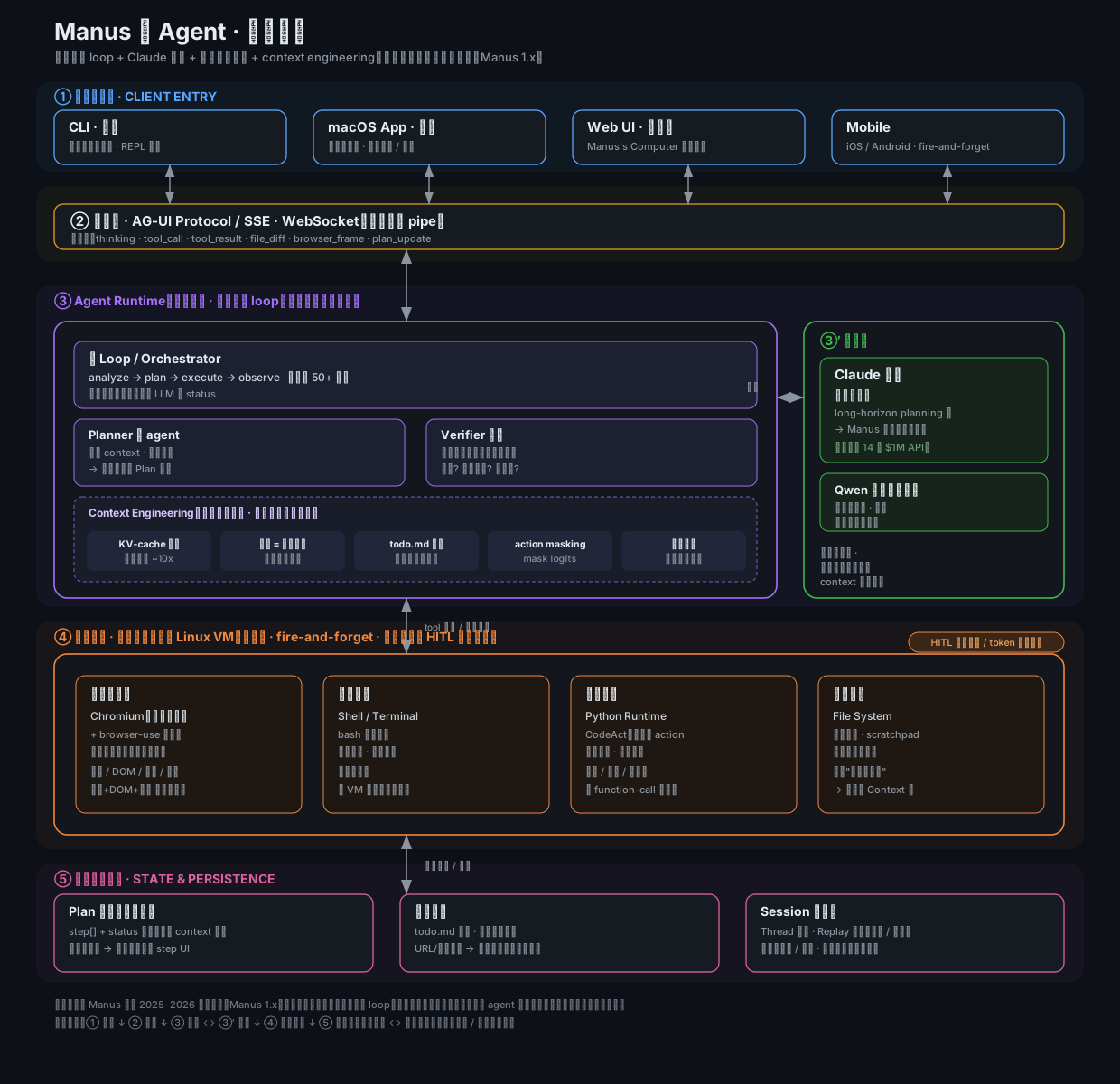
A useful contrast: the diagram below maps a Manus-style production agent end-to-end. It’s a different beast from open-lovable’s hardcoded workflow — five layers stacked vertically: ① client entries (CLI / macOS / Web / Mobile, fire-and-forget because execution lives in the cloud VM, not on your laptop like Cursor); ② transport (AG-UI / SSE / WebSocket streaming each step back to the client — that’s how you get the “live operation replay”); ③ agent runtime + model layer (a hand-rolled thin loop, not LangChain or AutoGen — the main loop owns the state, the Planner is a throwaway sub-agent, the Verifier does computable validation, and the dashed band underneath is the real moat: KV-cache, files-as-memory, todo.md recitation, action masking, keeping errors; the model on the right is Claude, picked for long-horizon planning); ④ cloud sandbox (browser ops via Chromium + the protocol layer of browser-use; computer ops via shell; code execution as CodeAct; the filesystem doubling as “unlimited context” — HITL confirmation on critical actions, tokens never leave the sandbox); ⑤ state & persistence (the structured Plan object that drives the front-end step UI, file-based memory with todo.md plus restorable compression, and Session for replay / pause / resume).
The single line worth memorizing: the framework is not the moat — context engineering is. The diagram’s text is in Chinese (authored alongside the Chinese edition); the English narration above mirrors every block.
The highlight: Agentic Search
In edit mode it doesn’t dump the whole codebase into the generator. It runs a two-phase, deterministically orchestrated retrieval:
Phase 1 Intent analysis (LLM): prompt + manifest → search plan
   e.g. "make the hero background blue" → searchTerms:["hero","background","bg-"], editType:UPDATE_COMPONENT

Phase 2 Search execution (pure code, no LLM): executeSearchPlan()
   - normalize paths (to /home/user/app/)
   - scan file contents for search terms
   - capture surrounding lines of matches
   - score by relevance (relevanceScore)

Phase 3 Target selection: selectTargetFile()
   - pick highest score + editType-compatible + file-type-appropriate
   - emit a "surgical context": single file + exact line number + confidence 0.95
Then it injects a surgical edit system prompt:
SURGICAL EDIT INSTRUCTIONS:
You have been given the EXACT location of the code to edit.
- File: /home/user/app/src/components/Hero.jsx
- Line: 42
- Reason: Found 'bg-' class in Hero component
Make ONLY the change requested. Do not modify any other code.
The payoff (per the DeepWiki index): agentic search hits the right file with 90–95% confidence versus 60–70% for naive keyword matching, and it pinpoints the line. The cost is one extra LLM call + 50–200ms of search.
The design philosophy matters here: a problem you could hand to the LLM to explore via free-form function-calling — “which files should the agent read?” — is reduced to “the LLM only emits search terms → code does deterministic retrieval and scoring.” Replacing an uncertain agent loop with deterministic code buys controllability and cost.
Why score at all?
The root cause is a many-to-one disambiguation problem. A single set of search terms will almost always hit multiple locations — “make the hero background blue” decomposes into hero / background / bg-, which may appear in App.jsx, Hero.jsx, Header.jsx, and index.css at once. Without ranking you’re left with two bad options:
- Stuff every match into the context: token bloat, and the model may edit several places at once, or the wrong place;
- Pick one arbitrarily: probably the wrong one.
The fatal flaw of naive keyword matching is exactly this “all-or-nothing” — it can only tell you “match / no match,” never “which match is most worth editing.” Scoring imposes a total order over all candidates so it can reliably select the single primary target. relevanceScore is not one-dimensional; it combines:
| Dimension | Meaning |
|---|---|
| Term frequency | how densely the terms appear in that file / that line |
| Location | whether the hit is in a component definition, a className, or a comment |
| editType compatibility | component edits prefer .jsx; style edits prefer lines with Tailwind classes |
| File-type fit | e.g. UPDATE_COMPONENT leans toward .jsx over .css |
The four purposes of scoring
- Disambiguation / single-target selection: collapse N candidates into 1 primary file — the prerequisite for “surgical editing” (single file, single line);
- Ranking for the model: within the context budget, put the most relevant first;
- Line-level precision: the score carries the matched line number, so the prompt can say
Line: 42and the model locates it directly; - A decision signal for degradation: the score converts into a
confidence(0.95 on a hit). It’s not just ranking — it’s a gate: only high confidence takes the surgical path, otherwise it triggers fallback. In other words, scoring carries both “which one” and “should we trust this retrieval at all.”
Under what conditions does it terminate?
Three senses of “termination” must be distinguished — and their guaranteed haltability is precisely this design’s biggest advantage over an autonomous agent:
1. The search itself — naturally bounded, guaranteed to terminate. executeSearchPlan() is pure code scanning a finite file set (typically 10–50 files in the manifest, 50–200ms); it stops once everything is scanned. There is no model in the loop, so the classic “the agent doesn’t know when to stop” problem simply doesn’t exist — termination is free and certain. That’s the fundamental contrast with “the LLM decides the next step and may explore forever.”
2. Selection succeeds — output ends it. selectTargetFile() picks the highest-scoring file that is editType / file-type compatible, emits a confidence 0.95 surgical context, and the retrieval phase ends, handing off to the generator.
3. Search fails — degradation ends it (but it never fully fails). Any of the following terminates the agentic path and falls down a tier:
- intent analysis (that single LLM call) fails or times out;
- no usable manifest / file cache;
- zero search hits, or the top score is below the confidence threshold.
It then degrades through agentic search → keyword matching (selectFilesForEdit) → full context. DeepWiki states the principle plainly: every layer has a fallback, so the edit operation never fails completely — better to fall back to a lower-precision but guaranteed-to-produce method than to send the user away empty-handed.
In one line: scoring turns “several fuzzy hits” into “one target with a confidence”; and termination is a non-issue because the actual retrieval is done by bounded deterministic code, with the LLM responsible only for a one-shot emission of search terms — the part that could run away has been moved out of the loop entirely.
Why “no loop” is actually right
A classic agentic loop lets the model decide when to stop; open-lovable’s every step (scrape → analyze → retrieve → generate → apply → preview) is a hardcoded slot, with the model invoked only at fixed positions.
The benefits: predictable, debuggable, cost-controlled, never runs away. For a consumer-facing generator that’s exactly the right trade — you don’t want the agent deciding on its own to install 20 packages and touch 15 files. Controllability over autonomy is the watershed between production-grade and demo-grade.
4. The DIY Harness: Hand-Rolling Scaffold on the Raw API
This is the part I most wanted to write, and the most counterintuitive thing about open-lovable: it calls the LLM API directly, without the Claude Agent SDK, without a CLI tool, without any agent framework. So how does it supply everything a usable coding agent needs — orchestration, tool calls, context management, retry/recovery?
First, align on what “harness” means
The Claude Agent SDK / Claude Code give you a whole scaffold: the agent main loop, the native tool-use protocol, file tools, context compaction, retries. You just define tools and prompts. open-lovable gives all of that up, using streamText() as the sole point of contact with the model, and implements those capabilities itself. So its harness = “the entire DIY scaffold that turns raw streamText() into a usable coding agent.” It decomposes into five subsystems.
Subsystem 1: The model-call layer — streamText() as the only primitive
Rather than calling the Anthropic SDK directly, it goes through the Vercel AI SDK:
createAnthropic() / createOpenAI() / createGoogleGenerativeAI() / createGroq()
        ↓ unified into
streamText({ model, system, prompt }) → token stream
One interface for four providers, routed by model-ID prefix. This is the harness’s “swap the model” foundation.
Subsystem 2 (the soul): a text DSL instead of native tool-calling
This is the core decision of the whole harness. It does not use function-calling / tool-use; it invents an XML-ish text protocol that has the model write its “intended actions” into the body:
<file path="src/components/Hero.jsx"> ...full file... </file>
<package>lucide-react</package>
<edit target_file="src/App.jsx"><update>...diff snippet...</update></edit>
<explanation> ...user-facing note... </explanation>
The model never “calls a tool”; it merely emits tagged text. The real actions (writing files, installing packages, running commands) are executed in code by the harness after parsing the tags. In other words: tool-calling has been “protocolized and deferred” — the model declares intent, the harness lands it.
Subsystem 3: the streaming parser — slice files as tokens arrive
The streamText token stream is consumed in real time by a regex parser:
/<file path="([^"]+)">([^]*?)<\/file>/g
Each completed <file> yields a path + content, infers jsx/css/json, decides create vs. update, and pushes progress to the front end via SSE (thinking / stream / file-progress / complete). That’s where the “code appears live in the preview” experience comes from. Package names are extracted two ways: from <package> tags and from import X from '...' statements.
Subsystem 4: the reliability layer — truncation detection + focused completion + retry/fallback
The raw API gives no “output guarantees,” so the harness supplies them:
- Truncation detection (conservative, multi-signal): unclosed
<file>tags / HTML ending in</ brace difference > 3 / cut off right afterfunction X(){→ flagged as truncated. It deliberately skips checking for...to avoid false positives with spread operators and loading text; - Focused completion: it fires one more
streamTexttargeting only the truncated file and stitches the content back in place, rather than regenerating everything; - Retry/fallback: exponential backoff (2s/4s) on service-unavailable, auto-switch from Groq to GPT-4, skip-and-continue on tool-validation errors.
Subsystem 5: the context/memory layer — fully hand-orchestrated
No SDK auto-context management; it computes everything itself:
- manifest + agentic search: on edits it doesn’t ship the full codebase — the model emits search terms, code does deterministic retrieval, only the matched single file is included;
- Quota-ized conversation memory: last 3 edits + last 5 messages (each truncated to 100 chars) + last 2 major changes, capped at 2000 chars total;
- State lives in in-process globals + a backend file cache; no database.
Its “main loop” has no loop
| Claude Agent SDK paradigm | open-lovable paradigm | |
|---|---|---|
| Control flow | autonomous while-loop: decide → call tool → see result → decide again | a human-hardcoded state machine |
| Tool calls | the model requests tools in the loop | the harness executes after parsing text |
| Stop decision | the model decides | hardcoded at the pipeline’s end |
| Form | autonomous agent | workflow (chaining + routing) |
Why not the Agent SDK / tool-calling? (design motives)
This isn’t laziness — there are clear reasons:
| Need | Why a text protocol + DIY harness fits better |
|---|---|
| Streaming UX | Code must appear char-by-char in the iframe preview. Native tool-use returns structured blocks, hard to render at character granularity; a text stream parses and displays as it arrives |
| Multi-model | Switch freely across Anthropic/OpenAI/Gemini/Groq. Each has different tool-calling semantics; plain text tags are the lowest common denominator, one parser for all |
| Determinism | You don’t want the model deciding how many packages or files to touch. A hardcoded pipeline is predictable and instrumentable |
| Cost / latency | Avoids the multi-round trips of an agent loop; most generations finish in one streamText |
| Product form | It’s a consumer generator, not a developer’s autonomous agent — control over autonomy |
The price: where this DIY harness is fragile
- Regex-parsing LLM text is brittle: edge cases pile up and it breaks — which is exactly why all that truncation detection and fallback is forced into existence. It’s the inevitable tax of “trading a text protocol for multi-model + streaming”;
- No real agent autonomy: the model can’t explore the codebase or chain multi-step tool reasoning; the ceiling is set by the human-written pipeline;
- You maintain the tool protocol yourself: the robustness of the
<file>/<package>/<edit>DSL and the constraint rules in the prompt are all hand-tuned; - No state persistence: in-process globals, lost on restart.
In one line: open-lovable’s harness replaces native tool-calling with a text protocol (gaining multi-model + streaming), replaces the autonomous agent loop with a deterministic pipeline (gaining controllability), and then uses a whole defensive-engineering layer to turn the raw API’s unreliability into production usability. It’s a textbook specimen of “depend on no framework, tame the raw API directly” — the exact opposite road from Claude Code’s “the framework manages everything for you.”
5. The Cloud Sandbox: A Swappable Execution Base, and Best Practices
For generated code to actually run and preview, you need a cloud execution environment. open-lovable supports two — E2B and Vercel Sandbox — and isolates them behind one abstraction. This layer is engineered well and deserves its own chapter.
Why a sandbox at all? What are the real scenarios?
First, a fundamental question: why not just run the generated code inside your own Next.js server process — why a separate cloud sandbox? Four reasons:
- It runs untrusted code. A generated React project must actually
npm installand start a Vite dev server — that is, execute arbitrary code. A singlerm -rf, an infinite loop, or a mining script could take down or compromise your entire backend. It must never share a home with your service process. - You need a real “machine.” A real filesystem, the ability to install npm packages, to start processes listening on ports, to be reachable by an iframe over the network — none of that comes from “calling an API”; it requires a (virtual) machine.
- Multi-tenant isolation. Each user / each session must be isolated; user A’s code must not see or touch user B’s files and processes.
- Ephemeral + billed. Destroyed when the session ends, leaving no trace, billed by the minute.
These needs go far beyond open-lovable. The general scenarios: AI code interpreters (the ChatGPT Code Interpreter class), an agent’s code-execution tool, online IDEs / playgrounds, ephemeral CI environments, data-analysis sandboxes — anywhere you “let an AI or a user run code you can’t trust in advance” needs this layer. A sandbox isn’t a performance optimization; it’s a security boundary.
E2B’s internals: Firecracker microVMs and their relationship to Linux
E2B isn’t “containers as a service” — each sandbox = a Firecracker microVM. That fact determines its isolation strength and is worth spelling out.
What Firecracker is. It’s AWS’s open-source lightweight Virtual Machine Monitor (VMM), and the same technology behind AWS Lambda / Fargate, handling tens of trillions of function invocations a month. Its design goal is exactly “as fast as a container, as isolated as a VM.”
The crux: a microVM is not a container. This is the heart of E2B’s security model:
| Container (Docker) | Firecracker microVM (E2B) | |
|---|---|---|
| Kernel | shares the host’s single Linux kernel | each VM runs its own independent Linux kernel |
| Isolation | namespaces / cgroups (software) | KVM hardware virtualization (CPU-level) |
| Escape risk | a kernel bug can escape to the host | zero shared kernel code between sandboxes; lateral spread blocked at the root |
| Startup | milliseconds | ~125ms (snapshot restore ~150ms cold start) |
| Best for | trusted workloads | untrusted code execution |
Containers carve up resources on the same kernel via namespaces/cgroups — and the moment that shared kernel has a bug, it can escape to the host and reach other tenants. Firecracker uses KVM hardware virtualization, so each microVM has its own independent Linux kernel, with zero shared kernel code between sandboxes. That’s precisely why “running untrusted AI-generated code demands VM-level isolation, not container-level.”
Its relationship to Linux. Inside each sandbox is a stripped-down real Linux: its own kernel + a minimal root filesystem. So you can npm install, run Node, and listen on port 5173 — no different from a real Linux box; but it’s fully walled off from the host and other tenants by Firecracker’s hardware-virtualization boundary. Firecracker also deliberately removes most device emulation (no BIOS, no PCI, a minimal device set), shrinking the attack surface to near-nothing with only ~5MB of memory overhead — which improves both security and startup speed.
Why it’s so fast — snapshots. E2B pre-warms a pool of VMs to a ready state and takes memory snapshots; an incoming request restores from the snapshot rather than booting a kernel from scratch, pushing cold start to ~150ms. It can also pause/resume (5–30ms) preserving memory + filesystem state, supporting multi-turn agent sessions with persistent state — which is why I noted earlier that E2B “supports reconnect by ID at the SDK level.”
Back to open-lovable. It runs setupViteApp() to start Vite inside this E2B microVM, writes the generated files in, and feeds the microVM’s exposed URL to the iframe. The earlier emphasis on “wrap commands in a Python subprocess, pass args as an array to prevent injection” matters precisely because what runs in this layer is untrusted code — VM isolation is the first line of defense, subprocess injection-safety the second; you want both.
A note on the isolation spectrum: plain containers (fastest, weakest isolation) → gVisor (Google’s user-space kernel intercepting syscalls, in between) → Firecracker microVMs (strong isolation, still fast) → traditional QEMU full virtualization (heaviest). E2B picks Firecracker, landing right on the “isolation strength vs startup speed” sweet spot.
E2B vs Vercel Sandbox: the underlying differences
Both are “on-demand, isolated cloud execution environments” (microVM / container, networked, can run arbitrary code, ephemeral), but their execution models differ completely:
| Dimension | E2B (@e2b/code-interpreter) | Vercel Sandbox (@vercel/sandbox) |
|---|---|---|
| Positioning | a code-interpreter sandbox built for AI agents | a general Node sandbox on Vercel’s edge infra |
| Runtime | Python kernel (runCode() runs Python) | Node.js 22, runs shell directly |
| Working dir | /home/user/app | /vercel/sandbox (hardcoded) |
| Auth | E2B_API_KEY | OIDC Token (auto in deployments) or PAT |
| Command exec | wrapped in Python subprocess.run(shell=False) | SDK runCommand() directly |
| File API | native files.write/read | writeFiles() (Buffer) |
| Reconnect | SDK supports reconnect by ID (placeholder in repo) | not supported |
| Timeout | adjustable, default 10 min | fixed at creation, default 300s |
| Output type | string | string or function (must await) |
| Best for | security-sensitive, cross-platform-consistent execution | shell-heavy, Vercel-ecosystem fit |
In one line: E2B is a sandbox “born to execute code for AI,” strong on isolation; Vercel Sandbox is “temporary Node app hosting,” strong on seamless integration with Vercel deploys and the edge network.
Base class + factory: the core decoupling point
A SandboxProvider abstract class fixes the contract: createSandbox / runCommand / writeFile / readFile / listFiles / installPackages / getSandboxUrl / terminate / isAlive, plus optional setupViteApp / restartViteServer. Each provider implements it; the createSandbox() factory picks one by env var. The business layer depends only on the abstract interface and has no idea who’s underneath. This is the most copy-worthy design in the whole sandbox layer.
Two radically different execution strategies
E2B: wrap everything in Python. Every shell command becomes:
import subprocess, json
result = subprocess.run(json.loads('["npm","install"]'),  # array args, shell=False
    capture_output=True, text=True)
print(result.stdout)
Why? Three reasons: no shell injection (array args, no string concatenation), cross-platform consistency (Python smooths differences), structured output (can return JSON). File writes prefer the native files.write(), falling back to Python os.makedirs + open. The code running in the sandbox is untrusted AI output — injection risk is real.
Vercel: direct shell + multi-tier fallback. It calls runCommand({cmd, args}) directly, but must handle a gotcha — Vercel’s SDK stdout/stderr may be a function or a string, so both cases are handled. File writes: try writeFiles(), fall back to mkdir -p + echo redirection (with content escaping). npm install is two-stage too: direct first, then sh -c 'cd /vercel/sandbox && npm install'.
The Vite scaffold’s network config (the most common snag)
Both providers’ setupViteApp() produce identical project structures, but a few vite.config.js settings are the crux:
host: '0.0.0.0',        // required, else the iframe can't reach it across the network
hmr: false,             // HMR off — stability over speed
strictPort: true,       // pin port 5173, predictable URL
allowedHosts: [...]     // whitelist E2B/Vercel domains, else Vite blocks them
Startup: E2B runs it in the background via Python Popen(); Vercel uses nohup ... & with logs redirected to /tmp/vite.log. After launch it hard-waits 7 seconds to ensure the server is ready before returning the URL.
Lifecycle: singleton + idle GC for cost control
SandboxManager is a global singleton that registers all sandboxes in a Map<sandboxId, SandboxInfo>, recording createdAt / lastAccessed. getOrCreateProvider() tries to reconnect for E2B and creates fresh for Vercel; sandboxes idle beyond maxAge (default 1 hour) are auto-terminate()d; every access refreshes lastAccessed so active sandboxes are never killed prematurely.
Best practices (distilled from the code)
- Always isolate the vendor behind a Provider abstraction — avoid lock-in, and make local/test mocking easy.
- Prefer “array args” for command execution; never concatenate shell strings — E2B’s
subprocess.run(array, shell=False)is the anti-injection template. - Give critical ops a “native API → shell fallback” dual path — sandbox SDKs are flaky at permission/path/network boundaries; a single path will break. Fallback isn’t redundancy; it’s the floor of production usability.
- Get the network-config trio right —
host:'0.0.0.0'+strictPort+ anallowedHostswhitelist are the hard prerequisite for an iframe to reach the dev server. - Trade predictability via “fixed delay + pinned port” — in short-lived, network-flaky sandboxes, stability beats raw speed.
- Manage background processes —
nohup/Popen+ log redirection +pkill -f vite || truebefore restart, else port conflicts and process leaks. - Centralized lifecycle + idle GC to stop burning money — sandboxes bill by the minute; forgetting to terminate means ongoing charges. This is the easiest money pit in self-hosting.
- Choose by “do you need persistent state” — E2B supports reconnect for long tasks; Vercel starts fast for one-shot previews.
- Clean up old instances on creation — both providers’
createSandbox()first kill/stop the old instance and clear file tracking.
Limits of this sandbox design
isAlive()only checks object existence, not real network/process health — a shallow check;- E2B reconnect is a placeholder in the repo (returns false); state is still lost on every disconnect;
- Global singleton + in-memory Map, no persistence — the registry is lost on restart, and it can’t scale horizontally;
- The hardcoded 7-second delay is a fragile compromise; polling the port until ready is better.
6. Takeaways: For Building Products and Writing Code
Condensing the dissection into directly reusable patterns:
- “A viral open-source demo as a growth funnel” — package your core capability as a shareable, complete app; stars convert into API users.
- The perceived-performance trio: parallel startup + placeholder screenshot + character-level streaming.
- A text DSL instead of tool-calling — when you need multi-model compatibility + character-level streaming, a custom
<tag>protocol is more flexible than native tool-use (at the cost of writing your own parsing and tolerance). - A deterministic pipeline instead of an autonomous agent loop — for consumer products, controllability beats autonomy.
- Agentic Search instead of full context — the standard solution for editing large codebases: the LLM emits search terms, code does deterministic retrieval. Cheaper and more accurate.
- Truncation detection + single-file focused completion — a resilience mechanism any product relying on long LLM output should copy.
- Quota-ize context — turn “memory” into an engineering problem with an explicit char/count budget.
- Provider abstraction + dual-path fallback — make both sandboxes and models swappable and degradable, to avoid single-vendor lock-in.
7. Conclusion: Not Freeing the Agent, But Boxing the LLM More Tightly
The most valuable thing about open-lovable was never the result “it generates code,” but the whole layer of defensive engineering it stacks to make unreliable LLM output usable: a streaming protocol, truncation recovery, agentic search, multi-tier fallback, perceived-performance tricks, swappable sandboxes.
It captures, in one line, the core difference between a “production-grade AI app” and a “demo-grade agent” —
The point is not to make the agent freer, but to use deterministic code orchestration to box in a nondeterministic LLM.
The model is bought; the harness is built. Whether or not you use an Agent SDK, the engineering that actually decides whether an AI app reaches production always lives in that ring of scaffold you wrote yourself, outside the model. open-lovable shows that ring, solidly, in full.
Sources
Responses